If you’ve been shooting video professionally—or even just getting serious about filmmaking—you’ve likely run into the limitations of your camera’s tiny built-in screen. That’s where an external monitor changes everything. The Atomos Shinobi II is one of the best-value field monitors to hit the market in 2026, offering a super-bright display, built-in camera controls, and a portable form factor that fits seamlessly into any rig.
Whether you’re a solo shooter, a run-and-gun filmmaker, or a YouTube creator, this monitor packs pro-level features into a compact, affordable package. After spending several months testing it in real-world conditions, here’s a full breakdown of what works, what doesn’t, and whether it deserves a spot in your camera bag.
---
Build & Appearance

Atomos Shinobi II mounted on a Sony a7S III with USB-C control and HDMI cable connected.
The Shinobi II feels robust right out of the box. It has a sleek, nimble profile with a matte finish, reinforced corners, and a display that stays readable even in harsh direct sunlight. The overall footprint is slim and compact, making it easy to mount on top of a mirrorless or cinema camera without throwing off your balance.
It pairs well with gimbals too. I mounted it on a DJI RS3 Pro without it feeling excessively heavy, which is a huge plus for gimbal shooters who need to keep their rig agile.
One minor design quibble: the bezel is slightly thicker than I’d like, making the actual screen area feel smaller than the monitor’s overall size. That said, it’s a small trade-off for the massive upgrade over squinting at your camera’s rear LCD.
The HDMI port is now conveniently located on the back—a welcome improvement over the original Shinobi, which had cables sticking out from the side. You also get a USB-C port for both power delivery and camera control. Note that the HDMI cable clamp is sold separately, but it’s worth picking up for peace of mind during critical shoots.
---
Ergonomics & Handling
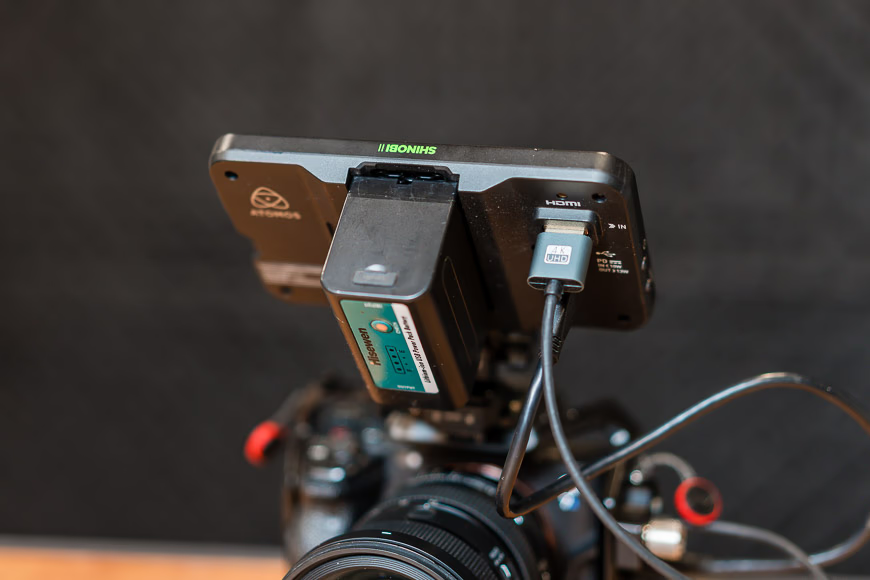
Atomos Shinobi II powered by an NP-F battery.
The touchscreen interface on the Shinobi II is noticeably faster and more intuitive than previous Atomos units. Navigating menus feels snappy, and the layout is well-organized for quick adjustments in the field.
The standout upgrade for me is the touchscreen camera control. You can remotely adjust exposure settings, start and stop recording, and—most importantly—activate your camera’s autofocus tracking directly from the monitor. On my Sony cameras, I can tap the screen to set a focus point and let the camera handle the tracking. While the tracking box shows up on the camera body, the Shinobi’s focus peaking confirms everything is sharp.
> One major win here is the dual power options: NP-F batteries for longer shoots and USB-C power for studio or cage setups. That makes it incredibly flexible depending on your rig.
The one downside is battery life. Even with camera charging turned off, an NP-F battery lasts only 1–2 hours depending on size. For all-day shoots, you’ll want to carry spares or keep a USB-C power bank handy. Hopefully a future firmware update can optimize power draw.
---
Performance
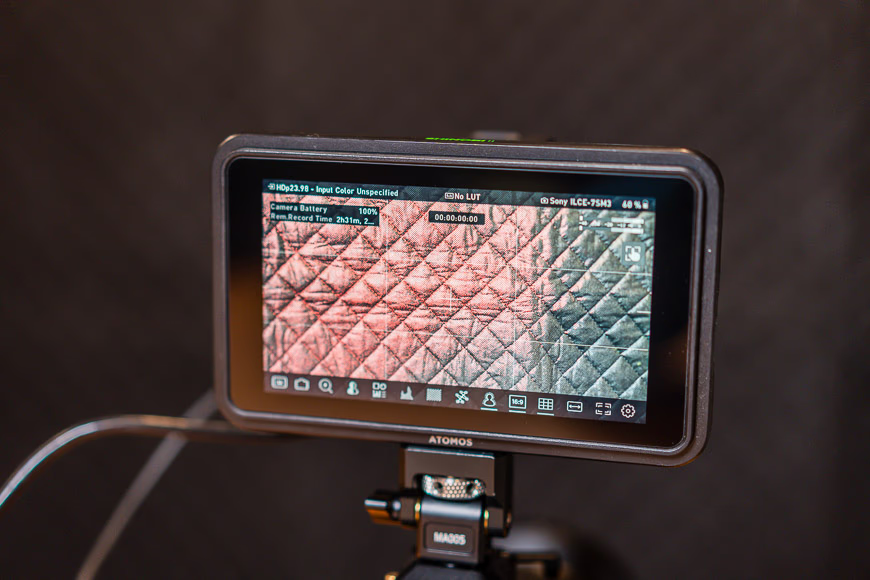
Atomos Shinobi II with focus peaking enabled.
In real-world use, the Shinobi II performs beautifully. The 1500-nit display is sharp, color-accurate, and easy to read even under bright sun. For anyone shooting in log profiles—like Sony’s S-LOG3—this monitor is a game-changer. You can load a LUT via the SD card slot and preview your graded footage live, making exposure decisions far more precise than relying on your camera’s small screen.
The exposure tools are excellent: waveform, false color, zebras, histogram, peaking, and customizable frame guides. That said, once I loaded my LUT, I found myself rarely needing false color or waveform—the display is accurate enough that you can trust what you see.
The one performance area that needs improvement is startup and shutdown speed. It takes several seconds to power on, which feels like an eternity when you’re chasing a fleeting moment. My workaround is simply leaving the monitor on between takes and carrying extra batteries.
---
Other Features Worth Noting

Atomos Shinobi II mounted on a Sony a7S III.
Touch-to-Track Autofocus: This is the feature that sets the Shinobi II apart from competitors. Being able to tap the screen and track subjects without looking away from the monitor keeps your focus (literally and figuratively) on the shot.
LUT Support: Load custom LUTs via the SD card slot to preview your final color grade in real time. This alone makes shooting in log profiles drastically easier and more reliable.
Tally Overlay: A red outline appears on screen when the camera is recording. It’s simple but incredibly useful—especially for overhead angles where you can’t easily reach the camera.
Pin Lock Mount: The mounting plate features a locking pin that prevents the monitor from rotating when bumped. It’s a small detail, but it makes a real difference during fast-paced shoots.
Remote Camera Control: With a long USB-C and HDMI cable, you can position the monitor anywhere—perfect for overhead rigs, desk setups, or self-recording scenarios.
---
How I Tested the Shinobi II

Atomos Shinobi II used in bright, sunny, and extremely cold conditions during a ski shoot.
I used the Atomos Shinobi II over several months across a wide range of scenarios: handheld outdoor shoots in harsh daylight, indoor YouTube content, and gimbal-based walkthrough videos. I paired it with cameras like the Sony FX3, a7S III, and Canon R5 C, and I compared it side-by-side with both the original Shinobi and the Shinobi Go.
No overheating issues. No connectivity problems. It performed reliably across every environment I threw at it.
---
Alternatives to Consider
If the Shinobi II isn’t quite what you’re looking for, here are a few alternatives:
- Atomos Shinobi Go – A more budget-friendly option with similar features but no touch capabilities.
- Neewer F500 Pro – A close competitor with touchscreen functionality, though responsiveness may vary.
- ANDYCINE A6 Lite 5″ – Affordable, but lacks the controls and feature set of the Shinobi II.
- Atomos Ninja Series – Adds external recording capabilities, but is heavier and more expensive.
---
Practical Tips for Getting the Most Out of the Shinobi II
- Carry multiple NP-F batteries or pack a USB-C power bank. The monitor draws 10–13W and will drain smaller batteries fast.
- Use the SD card slot to load custom LUTs before your shoot. It makes exposure in log profiles much more intuitive than relying on false color alone.
- Pair it with a NATO rail mount for quick attachment and removal on a cage or gimbal.
- Invest in the optional HDMI cable clamp if you’re shooting handheld or on a gimbal—it prevents accidental disconnections.
- Leave the monitor on between takes to avoid the slow startup time, especially during fast-paced shoots.
---
Value for Money
At just under US$400, the Shinobi II hits a sweet spot. You’re getting pro-grade exposure tools, reliable camera control, and a daylight-viewable screen without the added bulk or cost of an external recorder. For creators who want clarity and reliability without breaking the bank, this monitor delivers serious value.
The amount of headache it saves in daily workflow—from nailing log exposure to controlling focus remotely—easily justifies the price tag.
---
Conclusion
The Atomos Shinobi II is a killer choice for filmmakers and hybrid shooters who need a clean, bright, reliable monitor without the bulk or expense of a recorder. It delivers strong performance in a portable package, and for most shooters, it provides everything you need to shoot confidently in any environment.
If you already own the original Shinobi, the upgraded controls, brightness, features, and connectivity make this a worthwhile upgrade. If you’re still relying on your camera’s tiny rear screen, this monitor will change how you work.
---
FAQ
Does the Shinobi II support internal recording?
No. It’s strictly a monitor, not a recorder. If you need ProRes or RAW capture, you’ll want to look at the Atomos Ninja series instead.
Can I load custom LUTs onto the Shinobi II?
Yes. Just save your LUT files to an SD card, insert it into the monitor, and apply your color profile to preview log footage in real time.
Is the Shinobi II good for gimbal use?
Absolutely. It’s lightweight, slim, and balances well on gimbals like the DJI RS3 Pro or Zhiyun Weebill series without adding excessive weight.
How does the Shinobi II get power?
You have two options: NP-F batteries for portable use, or USB-C Power Delivery for studio and cage setups. Both work reliably depending on your shooting situation.
Does the Shinobi II control the camera?
Yes. It handles exposure adjustment, touch-to-track autofocus, and start/stop recording over USB-C. Just make sure you’re running the latest firmware and check Atomos’s compatibility list for your camera model.